


Working Safes Minigame – Unreal Engine
Working Safes Minigame – Unreal Engine
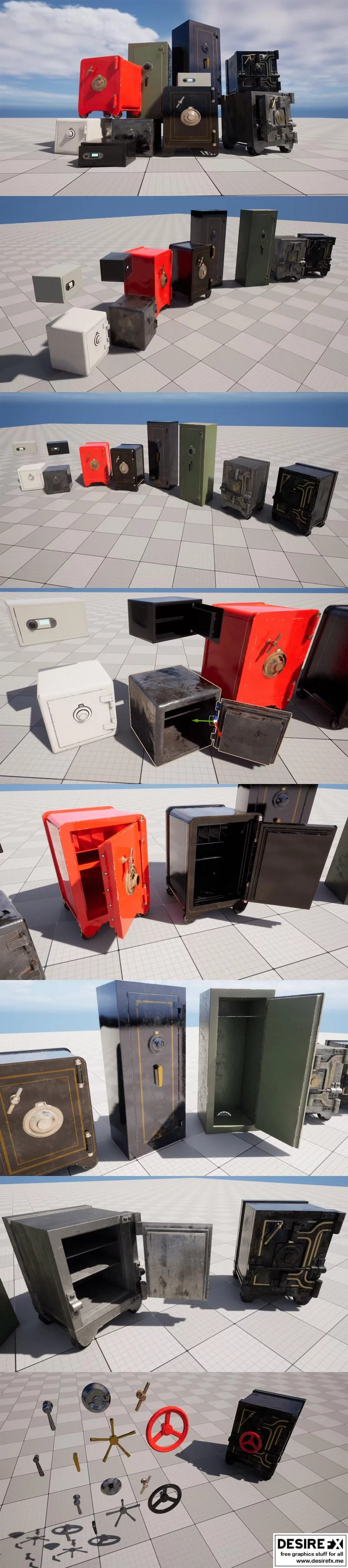
Super simple safes for your game worlds.
Easy and fast way to setup working safes in your scenes, no need to edit in blueprints just drag & drop and you are done !
Although you dont need to edit blueprints at all, everything is commented for your convenience.
Included:
10 premade safes
7 extra parts (dials & handles)
1 “safe_input_sender”-blueprint
1 safeInputInterface
4 materials ( 4K )
Setup:
drag “safe_input_sender”-blueprint to your scene, anywhere is fine (you can change inputs by editing this blueprint)
drag any safe (or many) from “Blueprints”-folder to your scene
edit dial & door speeds to your liking
set dial target amount (max 5) and set them to the numbers you want player to guess for (use whole numbers)
NOTE !!: for the demo scene, arrow inputs were removed from FirstPerson > input > IMC_Default
Operation:
get close to a safe (with a player controller)
press left & right arrow keys to move dial number (range 0 – 360)
while safe is still locked pressing down arrow key will move the dial faster
when dial number is same as “dial target” press up arrow key to change “dial target” to the next one ( wrong number moves “dial target” back by 1)
when all “dial targets” have been guessed correctly dial won’t move anymore and safe is unlocked
pressing F key will open or close the safe now that it is unlocked and if you want, pressing down arrow on your keyboard will lock the safe again.
Features: (Please include a full, comprehensive list of the features of the product)
10 safe blueprints
1 “safe_input_sender”-blueprint
1 safeInputInterface
Demo scene
Number of Unique Meshes: 36
Collision: Yes, automatically generated
Vertex Count: 17 165
LODs: No
Number of Materials and Material Instances: 4
Number of Textures: 14
Texture Resolutions: 4K
Supported Development Platforms:
Windows: Yes
Mac: Yes
Unreal Engine versions: 5.1 – 5.4