


3D WebView for Windows and macOS (Web Browser) – Unity
3D WebView for Windows and macOS (Web Browser) – Unity
Easily display and interact with web content in 3D or 2D using the ultimate web browser plugin target=”_blank”>trusted by thousands of developers. Download a target=”_blank”>free trial and see the target=”_blank”>developer site for full documentation.
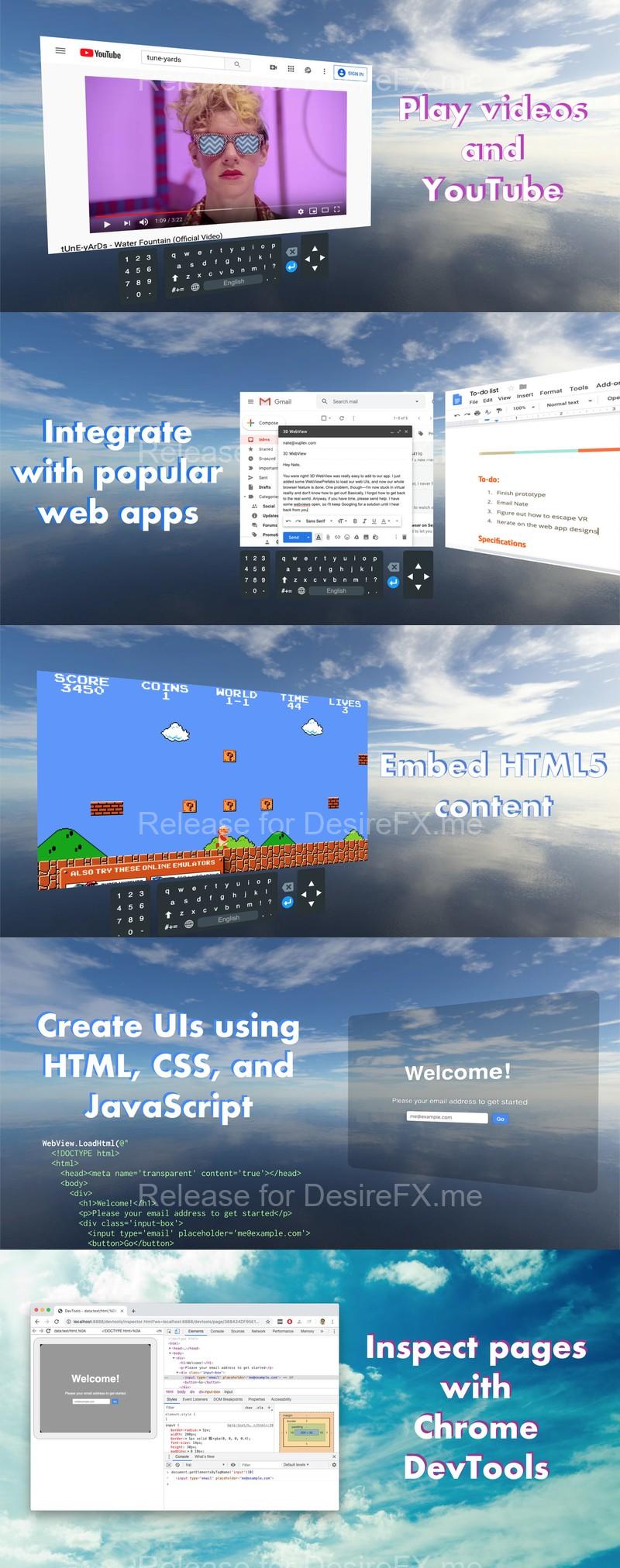
🌐 Load a webpage target=”_blank”>from a URL or target=”_blank”>HTML string
📺 Watch videos and YouTube ( target=”_blank”>including MP4s and streaming)
target=”_blank”>Create UIs with HTML
⚡️ Get started fast with the 3D target=”_blank”>WebViewPrefab or 2D target=”_blank”>CanvasWebViewPrefab, which render to a Texture2D and target=”_blank”>handle user interactions (click, scroll, hover, drag)
⌨️ Type with the included target=”_blank”>on-screen keyboard or native keyboard
• C# source code for a target=”_blank”>unified API that works seamlessly across target=”_blank”>Windows, target=”_blank”>macOS, target=”_blank”>Android, target=”_blank”>iOS, target=”_blank”>visionOS, target=”_blank”>WebGL, and target=”_blank”>UWP (each platform target=”_blank”>sold separately)
• Powered by target=”_blank”>Chromium (currently v137), with the option to use target=”_blank”>WKWebView on macOS
• Can render 144+ FPS on Windows using target=”_blank”>hardware acceleration for Direct3D11 (Direct3D12 renders at a lower rate without acceleration)
• Comprehensive APIs for target=”_blank”>controlling the browser and listening to target=”_blank”>browser events
• target=”_blank”>Execute JavaScript
• target=”_blank”>Send messages from JavaScript to C# and vice versa
• View and target=”_blank”>create PDFs
• Integrate with target=”_blank”>OAuth
• Includes additional APIs for target=”_blank”>platform-specific features
• Supports target=”_blank”>transparent pages
• Supports target=”_blank”>Input Method Editor (IME) for entering Chinese, Japanese, and Korean text input
• Supports target=”_blank”>outputting audio as a Unity AudioSource
Examples
• 3D WebView’s included demo scenes:
◦ SimpleWebViewDemo
◦ CanvasWebViewDemo
◦ AdvancedWebViewDemo
◦ CanvasWorldSpaceDemo
◦ PopupDemo
• target=”_blank”>XR Interaction Toolkit example
System requirements
• Unity 2019.4 or newer
• Windows 10+ (x64), supports both Direct3D11 and Direct3D12 (DX12) graphics
• macOS 10.13+ (x64 Intel, arm64 Apple Silicon) with Metal graphics
• Supports both Mono and IL2CPP
• By default, Chromium adds 360 MB to the app’s size, but this target=”_blank”>can be reduced to 250 MB
Important notes and limitations
• This package only supports Windows and macOS. To support other platforms, you can target=”_blank”>install additional 3D WebView packages, and you can save money on multiple packages by target=”_blank”>buying a bundle. All of the 3D WebView packages work seamlessly together, so all you need to do is install them into the same project, and then 3D WebView automatically detects and uses the correct plugin at runtime and build time.
• 3D WebView’s native Windows and macOS plugins are provided as precompiled libraries, and the native source code for them is not provided.
• The H.264 video codec for MP4s and streaming is disabled by default but target=”_blank”>can be enabled.
• The Windows plugin supports building for x86, but the resulting 32-bit app will only run on 64-bit versions of Windows because 3D WebView embeds a 64-bit Chromium executable.
• Building for the Mac App Store is target=”_blank”>supported by the WebKit backend but not the Chromium backend.
• On macOS, 3D WebView currently uses an x64 build of Chromium that runs on Apple Silicon via target=”_blank”>Rosetta. When an app runs for the first time on Apple Silicon, there is an initial delay while Rosetta translates Chromium’s machine code to arm64. In the future, 3D WebView will be updated to use a native Apple Silicon build of Chromium. For now, this Rosetta translation delay can be avoided by using the target=”_blank”>WebKit browser backend for macOS.
• Some of 3D WebView’s Chromium library files exceed GitHub’s maximum file size of 100 MB. So, if you save your code in a private GitHub repository, it’s necessary to use the steps outlined in target=”_blank”>this article to store the large files with Git LFS.
• The Windows and macOS plugins embed Chromium Embedded Framework, so you must display a copy of its included target=”_blank”>BSD-style license in your desktop app’s about page or credits.
Home Page: _https://assetstore.unity.com/packages/tools/gui/3d-webview-for-windows-and-macos-web-browser-154144