


Blueprint Outline – Unreal Engine
Blueprint Outline – Unreal Engine
BlueprintOutline — Marketplace Description
🎯 What does it do?
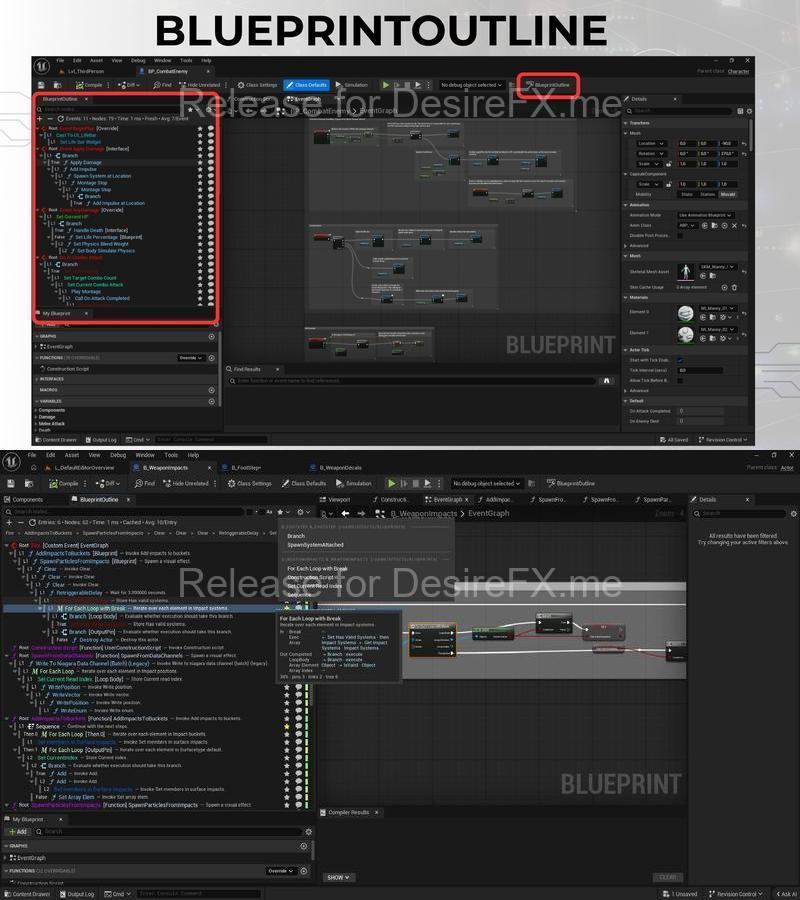
BlueprintOutline is a visual assistant tool for Unreal Engine. It converts complex Blueprint graphs into a clean, navigable execution tree — making it faster to understand, organize, debug, and document your logic. See the entire execution flow from Events to Nodes in a structured, hierarchical panel. Go further with one-click human-readable documentation export in plain text or Markdown.
🧩 Why is it needed?
In large Blueprint graphs, following execution flow is difficult and time-consuming. BlueprintOutline shows your entire logic in a tree-view panel directly inside the Blueprint Editor. Double-clicking any node instantly takes you to that exact point in the graph. Macros and Collapsed Graphs are expanded automatically. And when you need to share or review your logic, the built-in Documentation System converts your Blueprint into readable, noise-free text — no K2Node clutter, just clean output with inline pin values like Duration = 3.0 or Target = Character.
✅ Features
- Tree-based navigation (Event → Branch / Sequence → Nodes)
- Human-readable Blueprint Documentation (K2-noise-free)
- Inline pin values in documentation (Condition = true, Target = Decal, Duration = 3.0)
- Copy & Export as Plain Text (.txt) or Markdown (.md)
- Node pin details on hover — INPUTS / OUTPUTS listing
- Jump-to-node with double-click
- Node Renaming (for Custom Events)
- Node Comments (using native comment bubble)
- Bookmark System — save and return to important nodes
- Advanced Search & Filters — real-time, with regex support
- Keyboard Shortcuts (Ctrl+F, Ctrl+R, Ctrl+E, Ctrl+A, Ctrl+C)
- Branch & Sequence Support — True/False paths clearly shown
- Async Build System — handles large Blueprints without freezing the editor
- Multi-Editor Support — each Blueprint Editor window gets its own independent panel
- Full Localization — English and Turkish
🚀 Who is it for?
- Game developers working in Unreal Engine 5
- Technical designers managing complex Blueprint systems
- Indie teams and non-coders who rely heavily on Blueprints
- Anyone who needs to review, document, or hand off Blueprint logic
🛠️ Key Benefits
- Instant navigation in large or messy Blueprint graphs
- Export Blueprint logic as readable documentation — share with your team or use for code reviews
- Works immediately after installation — no setup, no configuration
- Zero runtime overhead — editor-only plugin, nothing added to your game build
- Each Blueprint Editor window operates independently
- Supports Unreal Engine 5.3 through 5.8
📋 Compatibility
- Unreal Engine 5.3 – 5.8
- Windows 64-bit & Mac
- Editor-only plugin (no runtime impact)
📚 Documentation & Support
- User Guide: Documentation: Overview: Community & Support:
Technical details
🧾 Blueprint Outline – Tech Sheet
Plugin Type: Editor-Only Plugin for Unreal Engine 5.5 – 5.6
Code Modules: 1 (BlueprintOutline – Editor module)
Number of Blueprints: 0
Number of C++ Classes: 25+
Network Replicated: No
Input: No
Localization: English, Turkish
Runtime Support: No – Editor Only
Navigation: Via Window → Blueprint Outline
Engine Integration: Exposes Blueprint structure as interactive tree
Macro/Collapsed Expansion: Yes (automated)
Jump to Node: Yes (single click)
Icon Sizes Included: 128px / 256px / 512px
Build Script: Included (PackageForMarketplace.bat)🖥 Supported Development Platforms:
- Windows: Yes
- Mac: Yes
📦 Supported Target Build Platforms:
- Editor-only plugin (not used in packaged builds)
- 📚 Documentation:
Included in plugin archive:
README : : YOUTUBE :
Compatibility
Supported Unreal Engine Versions5.7 – 5.8Supported Target PlatformsMacWindowsSupported Development PlatformsWindowsMacHome Page: _https://www.fab.com/listings/fa918f85-e4d0-4566-b1cd-787c3000c80f
P A S S W O R D
tcg4orc8ys49m5e0pu3r-DesireFX.me