


Maintainer 2 – Unity
Maintainer 2 – Unity
▶ target=”_blank”>Videos | 📖 target=”_blank”>User Manual | 📄 target=”_blank”>API Docs | 💬 target=”_blank”>Forums | 💌 target=”_blank”>Discord & target=”_blank”>Support
Why Maintainer?
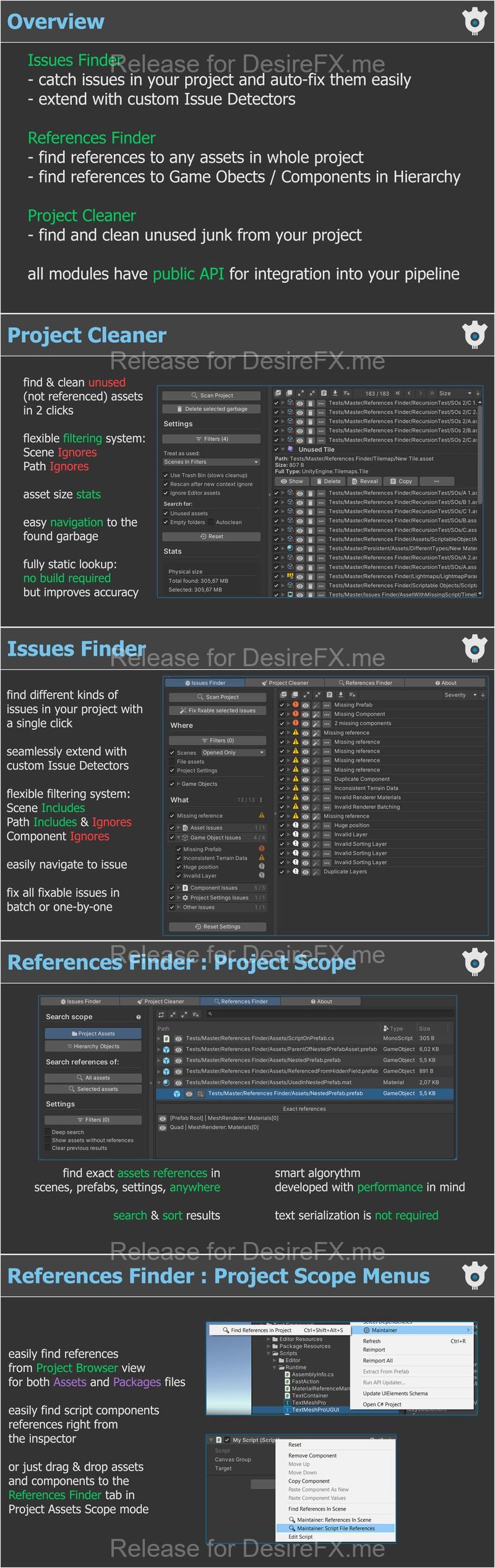
Maintainer bundles three powerful tools into one seamless Unity extension – no more juggling separate assets or manual cleanup scripts. Save hours of tedious work with a few clicks.
🔍 Issues Finder
- Deep scan across scenes, prefabs, assets & project settings
- Detects missing scripts, broken UnityEvent links, duplicate components, invalid layers, and many more
- Auto‑fix common problems or review before applying
▶ target=”_blank”>Watch Issues Finder in action
🔗 References Finder
- Project‑wide lookup: find where any asset (materials, sounds, textures, etc.) is used
- Hierarchy search: locate GameObject/component links in open scenes or prefabs
- One‑click navigation: jump straight to the source of every reference
▶ target=”_blank”> See References Finder demos: target=”_blank”>Project & target=”_blank”>Hierarchy
🧹 Project Cleaner
- Identify garbage: unused textures, meshes, scripts, large files
- Batch or one‑by‑one removal: keep only what matters
- Preview before you delete: avoid accidental loss
▶ target=”_blank”> target=”_blank”>See how to clean your project
📌 Highlights & Extras
- Ready to go: detailed user manual + step‑by‑step video tutorials
- Fully extensible: open API reference, add your own scanners or issue detectors
- Full C# source code included: customize every part to suit your workflow
- Continuous support: regular updates since 2015, active Discord community
“This is the only asset that every developer should have” – ★★★★★ user review
Licensing:
- Per‑seat license
- Save on seats with target=”_blank”>Maintainer for Teams: for the large scale companies.
Take control of your project’s health today – install Maintainer and ship cleaner, bug‑free builds!
Home Page: _https://assetstore.unity.com/packages/tools/utilities/maintainer-2-310179