


Northstar Navigation (Compass, Radar, Screen & Edge Overlay) [AI + MCP Ready] – Unity
Northstar Navigation (Compass, Radar, Screen & Edge Overlay) [AI + MCP Ready] – Unity
————————————————–
Support, Questions, News & Updates
➡️ target=”_blank”>Discord
➡️ target=”_blank”>Scripting Documentation
➡️ target=”_blank”>YouTube Tutorials
————————————————–
🤖 AI Skills — Now you can use Claude Code or other AIs, with or without Unity AI (MCP), to set up, manage, and code with Northstar & its tracking systems. Skills include adding the compass / radar / screen + edge overlay / navigation bar to your scene, marking objects as tracked and setting their values, swapping prefabs and overriding icon graphics, and writing custom code — custom distance text and demo-style “actions” like progress bars.
1. Install Claude Code or Cowork.
2. Run the bundled install.sh in your project: bash “Assets/Magic Pig Games (Infinity PBR)/Northstar Tracking System/Claude Skill/install.sh”
3. Verify step: Ask “What can you do with Northstar?” to confirm it’s active.
4. Open your agent and ask it to add tracking in plain English — e.g. “Track this enemy on the compass and show its distance on screen,” “Make quest objectives show an off-screen edge arrow that fades as I get closer,” “Turn the player’s gold into a gold marker on the navigation bar,” or “Build a hold-to-collect progress bar on the pickup icon like the Berries demo.”
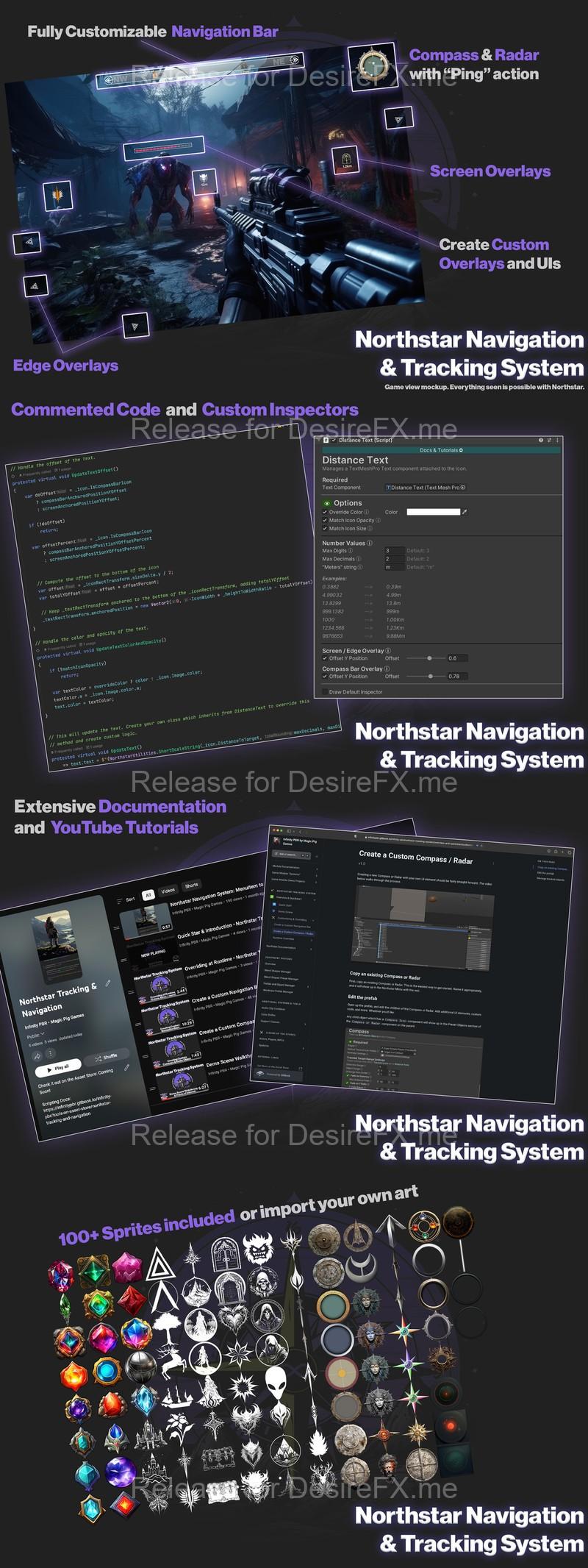
Northstar Navigation and Tracking System brings multiple popular UI systems to your project: Compass, Radar, Navigation Bar, Screen Overlays, and Edge Overlays!
Northstar is highly customizable, allowing you to expand the system to create anything you’d like for YOUR project. It comes with over 100 sprites for quick use, well commented documentation and custom Inspectors, and many YouTube tutorials along with comprehensive scripting documentation.
⭐️ Extensive target=”_blank”> documentation
⭐️ Tons of target=”_blank”>YouTube videos
⭐️ Strong target=”_blank”>Discord community with support
⭐️ Active development and updates
Features many systems — use them all, use only the ones you want, and each object can pick and choose where and how it gets displayed.
Navigation Bar
Create a horizontal navigation bar showing the direction of points of interest, enemies, and anything else you’d like to highlight.
Screen & Edge Overlays
Add UI icons over objects in the scene, and transition smoothly to edge icons, indicating the direction toward the objects.
Expand this and customize to create pickups, health bars, NPC conversations, and anything else you’d like.
Compass & Radar
Quickly add a compass or radar to your project. UI elements can be easily set up and customized to point at specific locations, or indicate the presence of objects in relation to the player.
Radars add a “ping” element with options to cusomize the interactions with objects.
Extensible
Everything is extensible, allowing you to expand and modify the logic to suit your game, and create the Navigation and Tracking system that YOU want for YOUR project.
————————————–
Check out more info & all of our models at target=”_blank”>InfinityPBR.com
————————————–
If you do get this package, thank you very much! Please leave a rating and review so others can find out what’s what about it!
For discussions on how to expand on this project, please join the target=”_blank”>Discord!
Home Page: _https://assetstore.unity.com/packages/tools/gui/northstar-navigation-and-tracking-system-compass-radar-screen-ed-265823