


Smart Apply Scale v1.6.0 for Blender
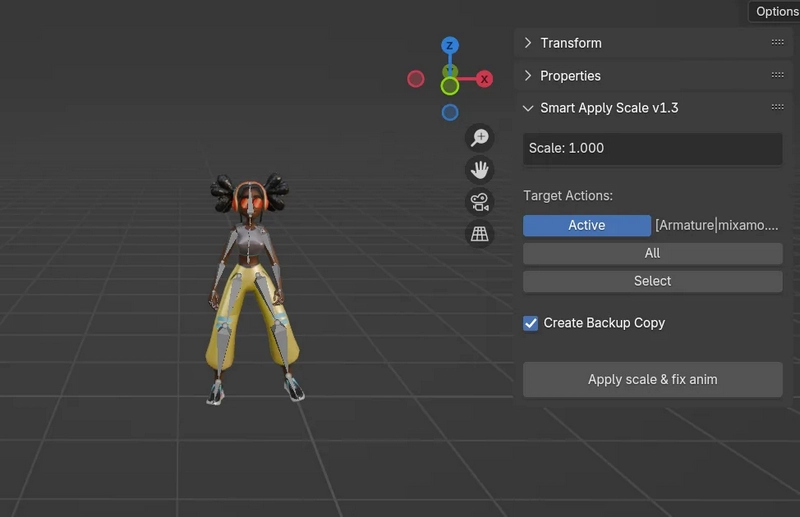
Smart Apply Scale v1.6.0 for Blender
Apply scale to armatures and automatically fix animation keyframes.
Description
When you apply scale to an armature in Blender, all location keyframes in animations become incorrect because they don’t account for the scale change. This addon solves that problem by automatically correcting all location keyframes after applying scale.
Features
Smart Scale Application: Applies scale to armatures while preserving animation integrity
Automatic Keyframe Correction: Multiplies all location keyframes by the scale factor
Safety Checks:
Detects non-uniform scale and warns the user
Prevents applying scale if armature has scale keyframes
Shows clear warnings before destructive operations
Backup System: Optional automatic backup of actions before modification
Active Action Focus: Processes only the active action to avoid unintended changes
Usage
Select an armature with non-uniform scale
Open the 3D Viewport > Sidebar > Item Tab
Find the Smart Apply Scale panel
Enable “Create Backup Copy” if you want to preserve original animations
Click “Apply scale & fix anim”
The addon will:
Apply the scale transformation to the armature
Multiply all location keyframes by the scale factor
Adjust delta location accordingly
Create backup copies of modified actions (if enabled)
Requirements
Blender 2.8 – 5.0
Armature must have uniform scale (X = Y = Z)
Armature must not have scale keyframes
Location
View3D > Sidebar > Item Tab