


LanguageStatusBar – Unreal Engine
LanguageStatusBar – Unreal Engine
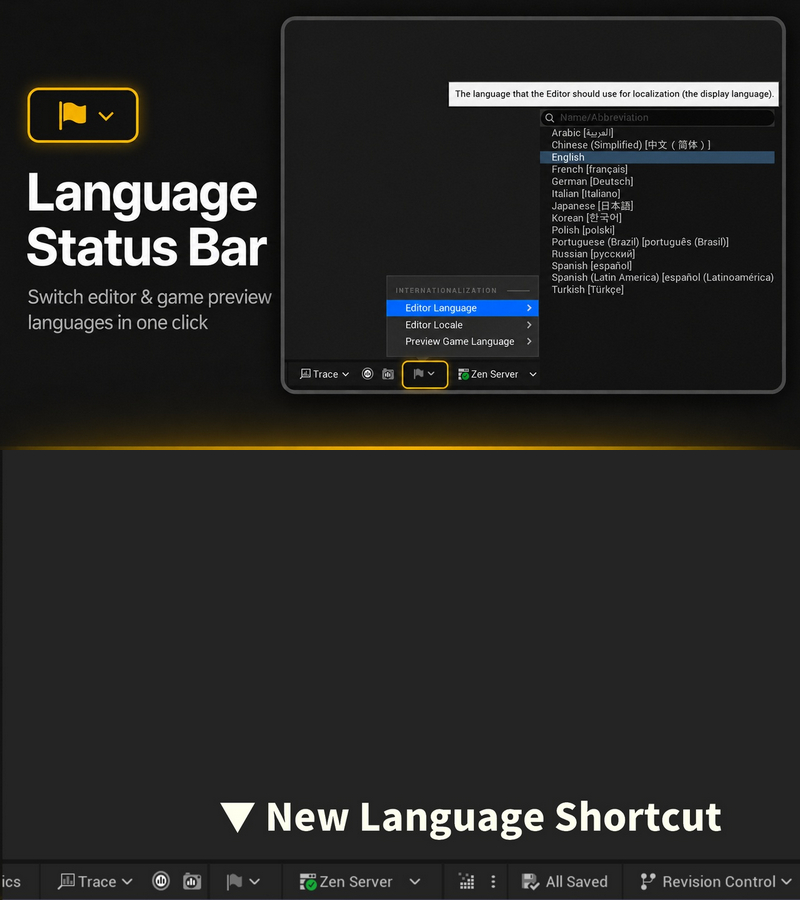
Switch the Editor Language, Editor Locale, and Preview Game Language directly from the
level editor status bar — no more digging into Editor Preferences.
Language Status Bar adds a small localization button to the level editor status bar
(next to Revision Control), giving you one-click access to the three language settings
Features:
– Switch the Editor Language, Editor Locale, and Preview Game Language directly from the level editor status bar
– Tooltip shows the current values of all three settings at a glance
– Searchable culture pickers identical to Editor Preferences
– Picking a preview language enables the game localization preview instantly; None disables it
– Settings are saved through the engine’s UInternationalizationSettingsModel, staying in sync with Editor Preferences and persisting across restarts
– Menu labels reuse the engine’s localization strings and follow the editor’s display language
Code Modules:
– LanguageStatusBar (Editor)
Number of Blueprints: 0
Number of C++ Classes: 1
Network Replicated: No
Supported Development Platforms:
– Windows: Yes
– Mac: No
Supported Unreal Engine Versions: 5.0 – 5.8
Supported Target Build Platforms: N/A (editor-only; adds nothing to packaged builds)
Example Project: N/A (editor-only utility; enable the plugin and the status bar button appears)
Important/Additional Notes:
– Editor-only module; no runtime code in packaged games.
– On UE 5.0/5.1 the culture pickers show a hierarchical tree instead of a flat list (same as those versions’ Editor Preferences). Everything else is identical across UE 5.0-5.8.
– Preview Game Language lists only cultures with compiled localization data (LocRes).
– Already-open editor tabs may keep the previous language until reopened.