


OG Main Menu System – Unreal Engine
OG Main Menu System – Unreal Engine
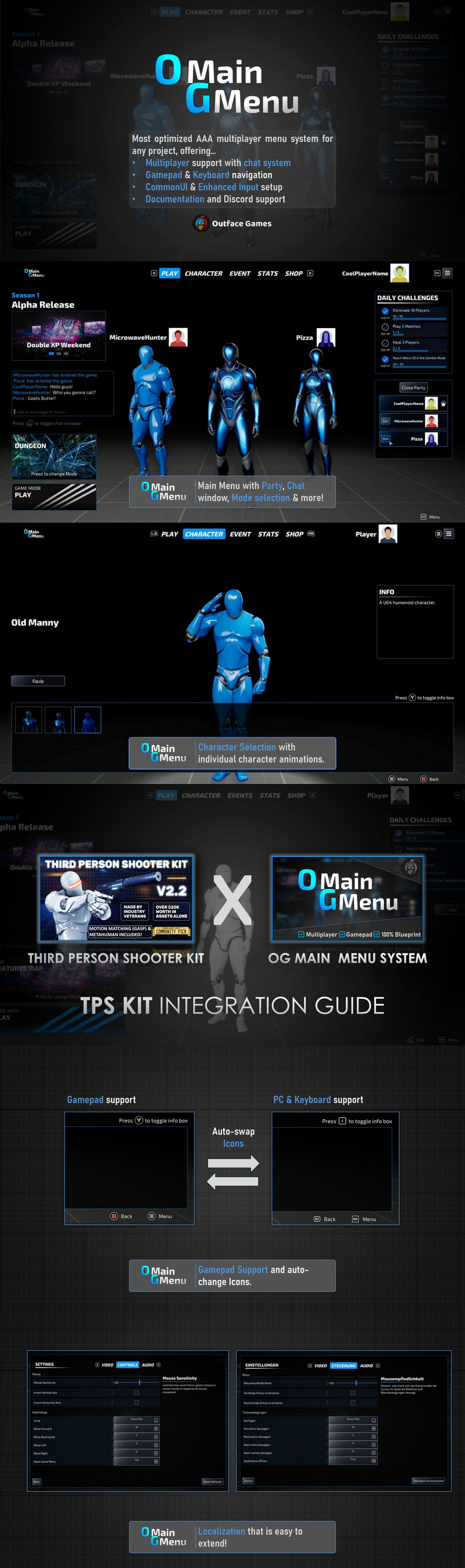
The OG Main Menu System is a polished, highly-optimized, AAA-style menu template designed for any game. It supports seamless Gamepad and keyboard/mouse navigation, with instant UI feedback through Common UI based on your input device and a full Enhanced Input support for rebinding controls.
Customize graphics, audio, display, and controls via the settings menu – accessible from both the main and pause menus. Setup your digital Avatar for everyone to see by choosing Skins via the Character Selection screen and profile images via the Profile Customization Menu.
Multiplayer support includes party and match creation & joining, a Chat System and seperate Host permissions in Menu and Game. The cherry on top is the built-in auto-scroll Credits Menu to highlight the real masterminds behind your product, your team.
Main Features:
100% Blueprint
100% Replication
Gamepad-Only Navigation
Keyboard-Only Navigation
Navigation:
Mouse & Keyboard Navigation
Keyboard Navigation
Gamepad Navigation
Startup Screen:
Startup Video (Placeholder to showcase how you can setup yours)
Main menu:
Intro screen that waits for key press (Button can be specified)
Lobby System
Create and join lobbies
Choose Game mode
Set Player Count
Party system
create and join parties
Player kick functionality (Host only)
Host indicator (crown icon)
Player profile menu with icon and name
icon + name
Profiles update in real-time for all party members
All party members Skin/Character visible standing next to each other:
Each skin has a unique animation (optional)
Skins update in real-time for all party members
3D Menu Map example included
Auto-switching Event banners
Showcase ongoing or upcoming events
Built-in chat system:
Send/receive messages
Updates by the server on who has joined, left or when the game is about to start
View chat history
Side menu with access to various sub-menus
Tab-bar navigation (Buttons can be changed):
Keyboard: A / D
Xbox: LB / RB
PlayStation: L1 / R1
Placeholder/Coming Soon menus to tease future content
Game-Mode selection
Daily Challenges template
Background music support
Advanced settings menu:
Modular settings widget
Localization / Language switching that is easy to extend
Setting Descriptions
Video settings: display, graphics quality, advanced graphics
Audio settings: volume controls, audio quality
Controls settings: remap inputs, camera sensitivity, etc.
3D Character Selection Screen:
Equip and preview skins
Custom name and description for each skin
Optional unique animations per skin
Customizable Character Selection background
Profile Customization:
Change your name and icon
Replicated across all players and widgets
Easily expandable
Chat System:
Write and Receive chat messages
Get the latest updates by the server on who has joined, left or when the game is about to start
View previously sent messages
Events Screen:
Let your player base know of any patches, events, updates or just wish them happy holidays!
Fully customizable:
Image, title, description
Rich Text support
Lobby setup:
Player list and connected player count (e.g., “Waiting for players: 2/10”)
Match launch countdown
Host-controlled kick functionality
Lobby-specific chat
Game Menu with info driven by data tables
Other widget classes:
Animated Loading screen
Popup Widgets (Example: “Are you sure you want to leave?” With options “Leave” and “Stay”)
Popup Messages (Feedback handling, error handling etc.)
Credits Menu (Let your players know the real heroes!)
Technical Setup:
Optimized for networking and performance
Modular Blueprint setup with reusable components
Includes practical Blueprint Function Libraries (BFL)
Multiple base widget classes (buttons, checkboxes, popups, etc.)
Fully replicated (multiplayer-ready)
Uses standard network classes (GameMode, GameState, PlayerController, etc.)
Clean, linear inheritance:Player Controller > HUD > Main Menu > Sub-widgets
Neatly organized folder structure
Fully replicated (Multiplayer ready)
Documentation and Support:
Extensive online documentation with a comments section
Many Comments and explanations inside the blueprints that also help with understanding UE replication
7-days a week Discord support
Plugins used: Common UI
Technical details:
Number of Blueprints: 61
Number of Textures: 275
Supported Development Platforms:
Windows: Yes
Linux: Yes
Mac: Yes
Supported Unreal Engine Versions: 5.3 – 5.7