


Vehicle Damage System – Real-Time Car Deformation – Runtime Static Mesh Deformation – Unreal Engine
Vehicle Damage System – Real-Time Car Deformation – Runtime Static Mesh Deformation – Unreal Engine
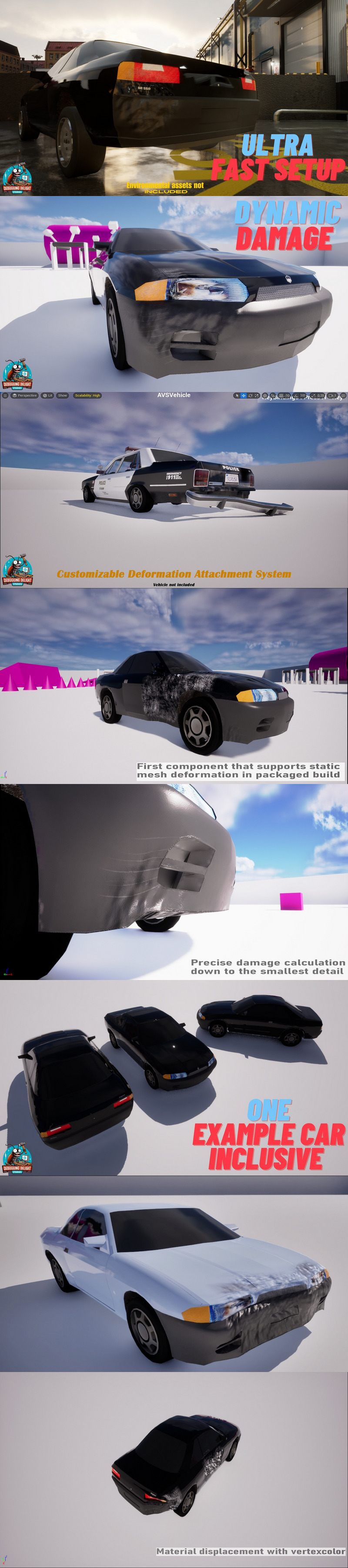
Real-Time Car Deformation and Runtime Static Mesh Deformation—without manually creating morph targets.
Add permanent collision damage to an existing vehicle project while keeping your current vehicle physics. The component-based workflow supports static-mesh-based and skeletal-mesh-based vehicles.
Tested with Chaos Vehicles, Advanced Vehicle System, FGear, and R-Tune. Multiplayer replication and Blueprint integration are included.
Why Choose This Vehicle Damage System?
Setup demonstrated in under five minutes: Add the component, assign the prepared deformation data, and configure its behavior. Tutorial recorded for version 1.x.
No manually authored morph targets: Prepare supported meshes with the included editor utility.
Static Mesh, Skeletal Mesh, and Multiplayer Support: Use the same network-replicated damage workflow with either vehicle type.
Existing Vehicle Integration: Add the component without replacing your vehicle physics solution.
High-Poly and Low-Poly Support: Use meshes with different shapes and vertex densities.
Blueprint Integration: Configure and control the system through a designer-friendly workflow.
Drivable Example Car: Start with a prepared example vehicle.
Real-Time Car Deformation
Create permanent dents and visible collision damage during gameplay. Real-Time Car Deformation can be combined with engine damage, localized hit reactions, protected passenger areas, detachable parts, and other gameplay logic.
The system is designed for racing games, driving simulations, crash experiences, vehicle combat, and multiplayer projects.
Runtime Static Mesh Deformation
The included Static Mesh Deformation tool prepares meshes inside the editor. It creates and manages the required deformation data and automatically groups vertices to reduce runtime processing costs.
This Runtime Mesh Deformation workflow allows static-mesh-based vehicles to receive visual crash damage without requiring a complete skeletal-mesh conversion.
Fast Setup
Prepare the mesh with the included Deformable Mesh Tool.
Add the deformation component to your existing vehicle.
Assign the generated deformation data and configure the behavior.
Use collision events to create deformation during gameplay.
Technical Information:
Latest Version: 2.2.1
Runtime Module: DeformableMeshComponent
Editor Module: DeformableMeshTool
Blueprints: 19
C++ Classes: 15
Network Replicated: Yes
Supported Development Platform: Win64
Supported Target Build Platform: Win64
LOD Support: Available with Realtime Mesh Component integration
Included Content
One drivable example car is included. Environmental assets visible in demonstration media are not included unless explicitly stated otherwise.
Features:
One driveable car included.
Runtime Mesh support
LOD support (with Runtime Mesh Component)
Highly performant at runtime.
Ultra Fast Setup.
Our Component Supports skeletal and static mesh based vehicle systems.
Supports high and low poly meshes.
The meshes can have any shape.
Deformable Mesh Tool:
Simplified Mesh Preparation: Easily prepare your static meshes for deformation without time-consuming setup.
Vertex Grouping: Automatically sorts vertices into groups to enhance performance and reduce CPU load.
Data Management: Create and manage deformation data assets effortlessly, enabling seamless integration with your vehicle systems.
Code Modules:
DeformableMeshComponent “Runtime”
DeformableMeshTool “Editor”
Number of Blueprints: 19
Number of C++ Classes: 13
Network Replicated: YES
Supported Development Platforms: (Win64)
Supported Target Build Platforms: (Win64)
Unreal Engine versions: 5.2 – 5.8