


Editor Console Pro – Unity
Editor Console Pro – Unity
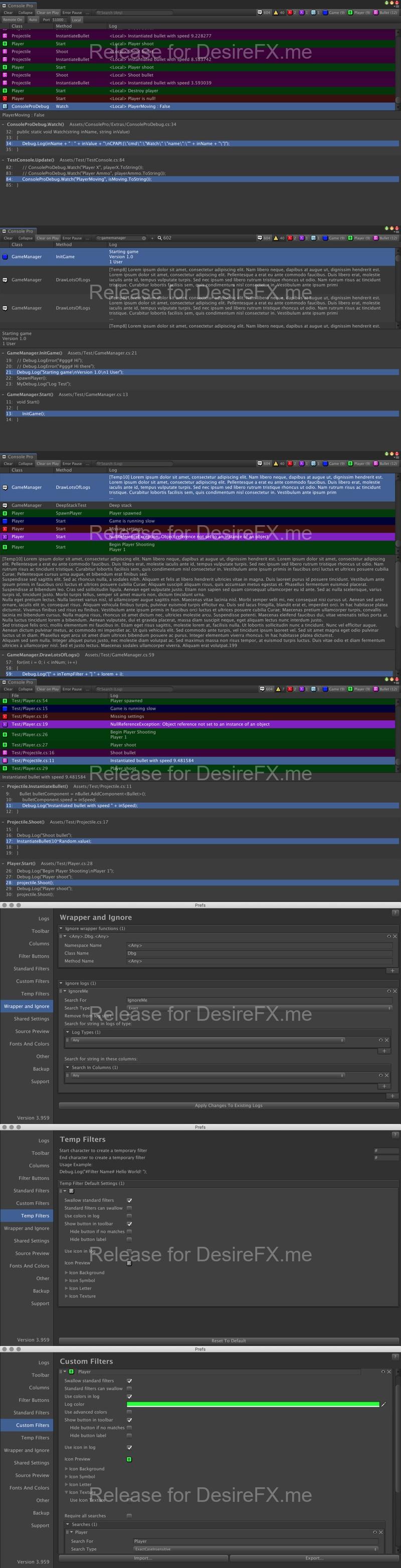
Editor Console Pro is a powerful replacement for Unity’s editor console.
As seen in:
Part of the 2017 Unity Mobile Essentials Pack!
target=”_blank”>Must-Have Unity Plugins [Gamasutra]
target=”_blank”>Unity Plugins Used While Developing Punch Club [Gamasutra]
Using Console Pro you can:
– Use a search field to filter all entries by text, file name, class, GameObject name on the fly.
– Search and filter using Regular Expressions.
– Create custom filter groups with their own colors, icons, and toggle buttons, instead of just the default Logs, Warnings, and Errors.
– See the source code surrounding each method call in the stack, allowing you to see and jump to the code around the log.
– Open your code editor to any method or line in a log’s stack by clicking on it, rather than just to the Debug.Log call.
– Easily see a log entry’s file name, namespace, GameObject name, and class in columns.
– Ignore logs you never want to see again.
– Ignore custom Debug.Log classes in the stack, so double clicking never takes you to the wrong code.
– Watch variables without spam using special logs that collapse even though they have different content.
– Use remote logging to get logs and stacktraces off of a standalone build or a phone/tablet build.
– Parse Editor.log or other log files as if they were the current logs
– Colorize the entire log line so you can quickly see different log types.
– Use custom fonts and colors.
– Copy full logs and stack traces to the clipboard with one click.
– Export the entire console output to a txt file, including stack traces.
– Override Unity’s status bar click.
target=”_blank”>Overview and tutorial video
Home Page: _https://assetstore.unity.com/packages/tools/utilities/editor-console-pro-11889